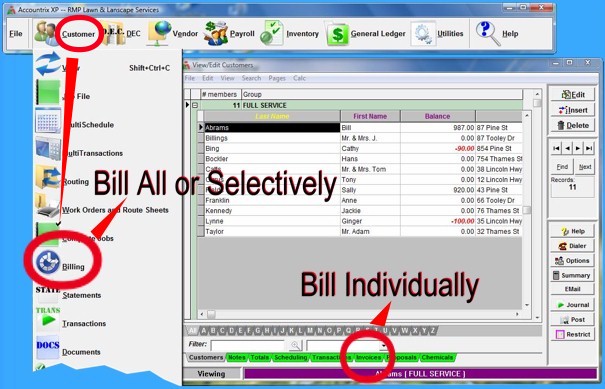
There are two methods of billing. Customers can be billed and invoices generated as a whole or selectively using the
Billing module. The user simply clicks on the Customer icon from the free floating Menu Bar at the top of the screen, then Billing. Billing parameters can be set to "All, Select, Group, Weekday, Tax
Code and Inactive," as well as correlate to "Include Payment Only Activities, Pause between pages, Print Payments and Credits, and Incl. Customers w/only a Prev. Balance."
Another way is click on the View/Edit Customers screen. Click on the name of the client to bill. Click on the green Invoices tab at the bottom of the screen, then the Insert button to create a new
invoice. Then send it to the screen or a printer.
Copyright © 1996-2007 RMP Communications Inc. All rights reserved.
No part of this web site may be reproduced or copied in any form
whatsoever, verbal, written, electronic or otherwise, without the
expressed written permission of the copyright holder. Violators
of this copyright and software pirates will be prosecuted to the
full extend of the law. Site created in the United States of America.